
Is your web page showing as Discovered – Currently Not Indexed? This means that Google knows about the page, but it hasn’t crawled and indexed the page within the Google rankings.
However, the pages are visible to users only if the direct link to the page is shared, as these pages are not included in any organic search result.
1How do you know if your page is Discovered – currently not indexed?
You can find if your page is in a state of discovered currently not indexed by heading over to the Google Search Console.
In the left menu of Google Search Console, select:
Google Search Console will then show the entire list of every page on your website that has been placed within the discovered currently not indexed state.
If you don’t use Google Search Console, then you can check if a specific URL is indexed by searching directly on Google using:
2What does Google say about it?
Although there are many reasons why a webpage could inherit the status of discovered currently not indexed, this is what Google official documentation says about it:
“Typically, Google wanted to crawl the URL, but this was expected to overload the site; therefore, Google rescheduled the crawl. This is why the last crawl date is empty on the report.”
I have found a few web pages that had been in this state for only a day or so before Google indexed and listed the page within the SERPs. So it’s likely a brand-new page that has just been published could fall into what Google is describing above.
However, many site owners find that their URLs can remain in this state for months on end, with no light at the end of the tunnel in terms of getting their pages indexed naturally.
3How to Fix Discovered – currently not indexed
There is no single silver bullet when it comes to fixing this status, as each website is unique. The solution will differ from one site to the next. Time tends to be a major factor, as younger domains (under 1 year old) can take a while for new pages to naturally get crawled by Google.
Here are the primary actionable fixes you can implement to persuade Google to crawl and index your web pages:
Poor content quality
Having thin or low-value content on the page is likely the primary reason your page was placed into this status. I have managed to get pages out of this state by adding additional in-depth content, answering user queries, and elaborating on key points.
Duplicate content
Many e-commerce and product pages get placed in this status because they copy verbatim descriptions from suppliers. To avoid this, rewrite product copy to ensure it is 100% unique and compelling for search algorithms.
Internal link structure & broken links
Strengthen internal links pointing to the excluded page from high-authority pages on your website (like your homepage or pillar articles). Ensure anchor text is descriptive and varied.
Check meta tags & XML sitemaps
Ensure a rogue noindex tag is not blocking bots. Validate that the URL exists in your XML sitemap and run a live URL inspection test in Search Console.
Google Instant Indexing API
You can use Google’s Instant Indexing API to directly push urgent URLs to Google for real-time crawling.
4Google Instant Index API
Google offers an instant indexing API that enables you to submit up to 200 URLs per day for fast bot crawling. I’ve used this many times for brand-new websites that were stuck in the Discovered – currently not indexed state.
To enable this feature, I use the SEOPress Pro Plugin to enter the code directly within WordPress. There are several setup stages involved, such as creating a Google Cloud service account, generating the JSON private key, and delegating Owner permissions inside your Google Search Console property.
The full step-by-step setup guide can be found here on SEOPress.
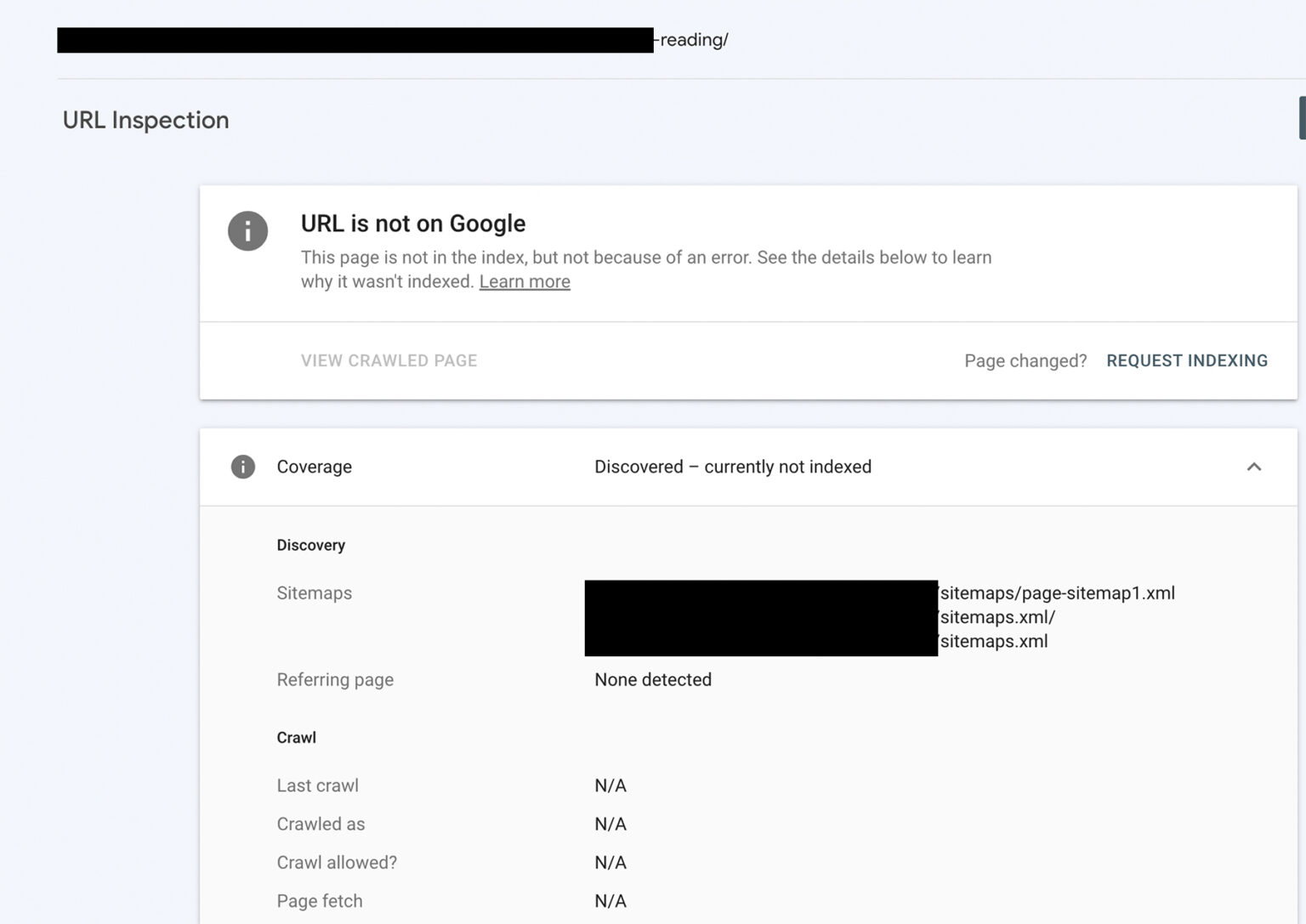
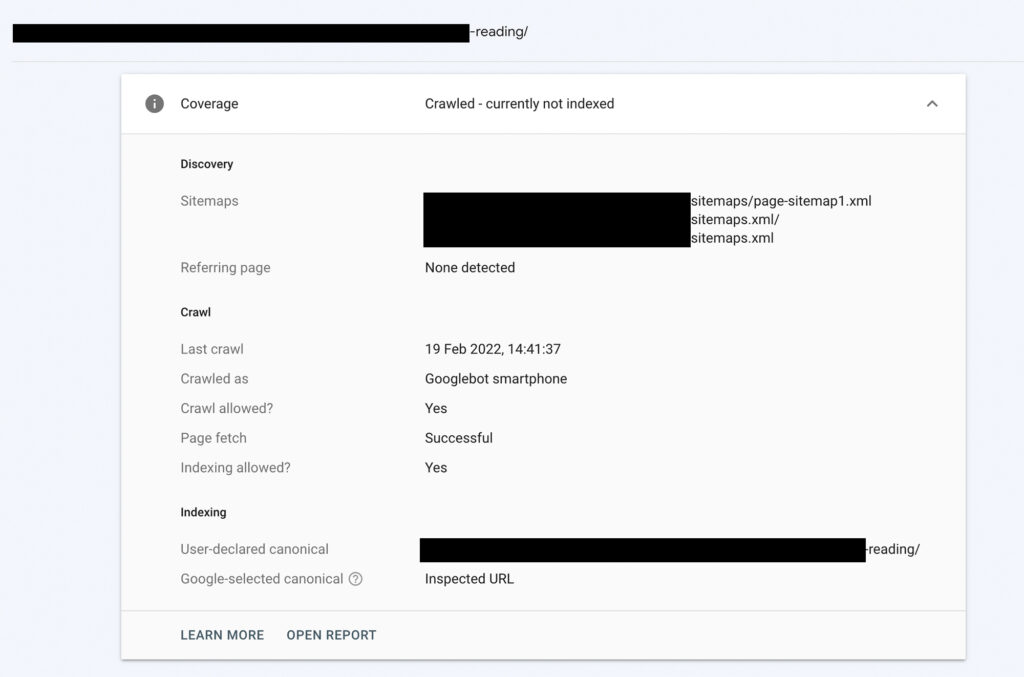
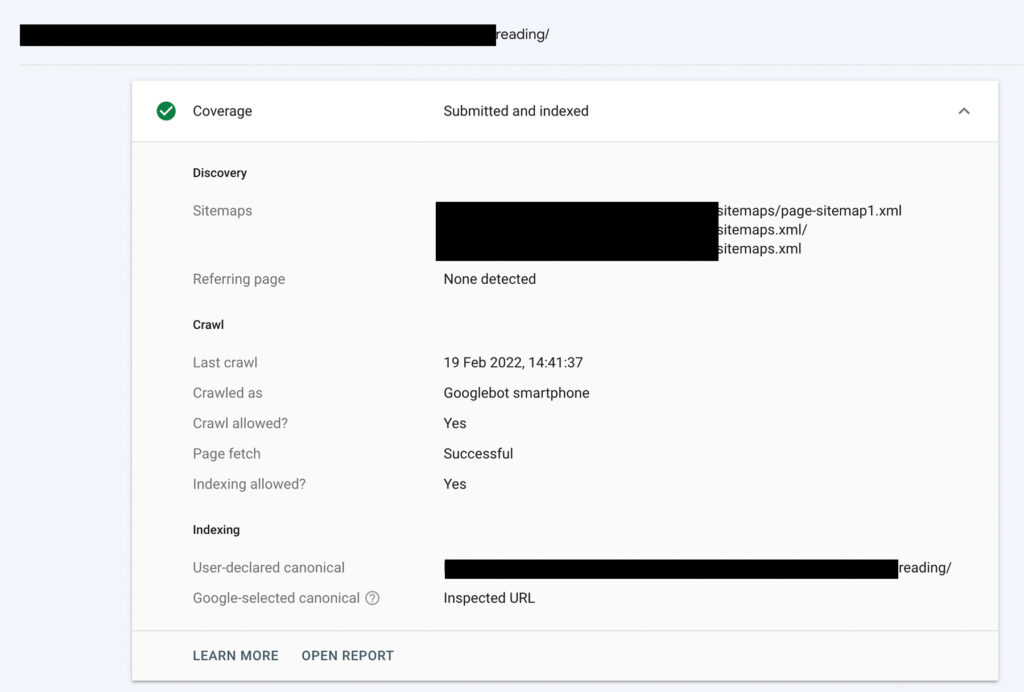
Using this API, I managed to index a stuck page in less than 1 hour. Here is the step-by-step progression:
Step 1: Before using Google API (Excluded State)
Step 2: After Adding Google Instant Index API (Crawled State)
Once you trigger the Google Indexing API, check back in Google Search Console. Within a few minutes, the status updates to Crawled – currently not indexed:
Step 3: Now The Page Is Indexed
This confirms Google has fully crawled the content. Shortly after, the URL is submitted and indexed directly into the Google live index:
5After you've made the changes
If you haven’t used the API and opted for manual content improvements and internal linking, head back to Google Search Console and click Validate Fix on the affected pages.
Results will not be instantaneous; expect to wait several days or a few weeks for Googlebot to re-queue the crawl. Remember that nothing is guaranteed: even after enhancements, Google chooses whether or not to allocate index resources based on search demand and site authority.
For more advanced strategies on improving your search presence, explore our dedicated Basingstoke SEO services.
Key Takeaways
Google is not obligated to index every single page on the web. Crawling and storing billions of web documents requires vast computing infrastructure. Google implements the Discovered – currently not indexed status to prioritize crawl budget for websites and pages that demonstrate clear authority, unique value, and relevance.